Line 6 Spider V 20 MkII Review – Flexible 20W Modeling Amp for Home Practice
This Line 6 Spider V 20 MkII review is for home players who want a small 20W modeling practice amp they can leave plugged in next to the desk or couch. The Spider V 20 MkII combines a single 8-inch speaker, 16 presets, Classic Speaker mode and USB recording, so it can handle quiet practice, simple demos and tone experiments without a pedalboard.
If you’re comparing the Line 6 Spider V 20 MkII practice amp with other beginner-friendly combos like the Fender Mustang LT25, stereo practice amps like the Blackstar ID:Core 10 V4, or smart desktop amps such as the Hotone Pulze, this review focuses on what it actually feels like to live with the Spider V 20 MkII day to day.
Who the Line 6 Spider V 20 MkII Is Best For
| Player type | How well it fits |
|---|---|
| Total beginner buying a first amp | Good fit if you are ok using an app for deeper control. The onboard presets are simple, and you can grow into the editor later. |
| Home player who wants one all-in-one rig | Strong fit. Covers clean to high-gain, has usable effects and works as a basic USB recording interface for demos. |
| Intermediate player focused on quiet practice | Good fit. Classic Speaker mode makes crunch and lead sounds feel more like a small real amp at bedroom volume. |
| Player who hates apps and menus | Not ideal. You can stay on the 16 presets, but most of the depth of the Spider V 20 MkII lives in the Spider V Remote editor. |
| Gigging player who needs band-level volume | Not recommended as a main gig amp. Twenty watts into a single 8-inch speaker is aimed at home and small-room use, not loud stages. |
Quick Specs
- Power: 20 watts solid state
- Speaker: 1 x 8″ custom woofer
- Presets: 16 onboard presets with 3 simultaneous effects plus independent reverb
- Models (via app): over 200 amp, cab and effect models available through Spider V Remote
- Controls: Drive, Tone, Volume, Reverb, FX buttons, Preset selector, Tap/Tuner, Classic/Full-Range speaker mode
- Inputs/Outputs: 1 x 1/4″ guitar input, 1 x 1/8″ stereo headphone/line out, 1 x micro-USB for app and recording
- Practice tools: onboard tuner, tap tempo
- Dimensions: approx. 331 x 310 x 211 mm; weight around 5 kg
On paper it is clearly built as a do-everything home practice amp: enough power for a bedroom, a full modeling engine under the hood, and a USB port that turns it into a simple recording interface. If you want to see how it compares in this price range, check the full best guitar amps under $200 roundup.
Build & Design
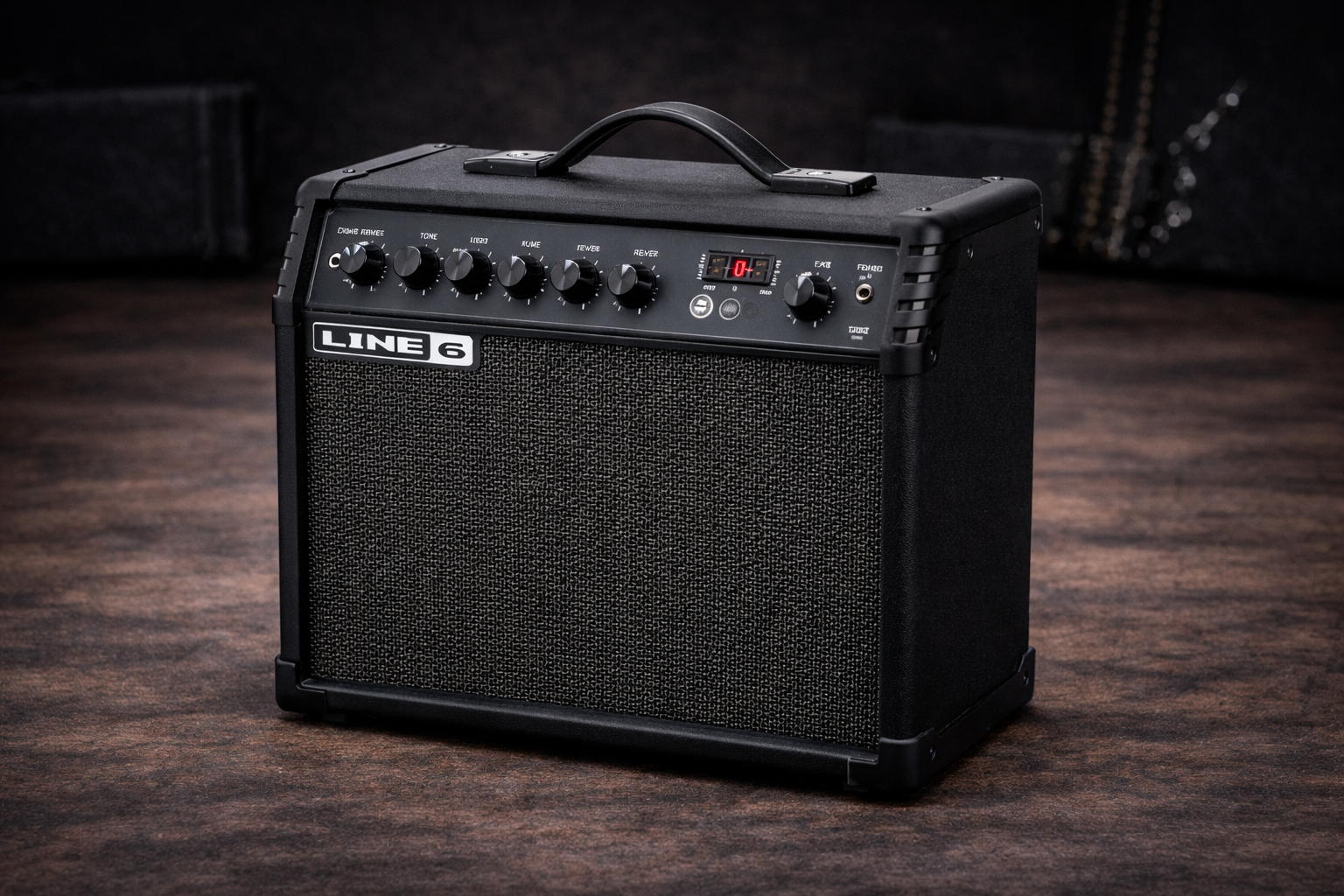
The Spider V 20 MkII follows the familiar Line 6 look: a compact black combo with a metal grille, simple top panel and angled control cluster. It is slightly deeper than some 8″ practice amps, but still compact enough to sit on a desk, shelf or small stand without taking over the room.
The enclosure is poplar plywood with textured black vinyl. It feels sturdy for its weight, and the metal grille adds a bit of confidence if you are going to move it between home, rehearsal space and small jams. At around 11 pounds, it is very comfortable to carry with one hand.
The top panel keeps the layout simple: Drive, Tone, Volume and Reverb knobs, a preset selector, FX buttons to toggle effects on and off, a Classic Speaker button, and a Tap/Tuner control. There is no screen, which keeps the interface approachable even if you are not a menu person; deeper editing happens in the app when you want it.
Line 6 Spider V 20 MkII Review: Sounds, Classic Speaker Mode and Presets
Out of the box you get 16 presets arranged across four banks, covering typical ground: clean, edge-of-breakup, crunch, higher gain rhythm, lead and some more effect-heavy patches. Each preset can run up to three effects plus reverb, and all of them can be edited and saved back into the amp via the Spider V Remote app.
The big change with the MkII series is Classic Speaker mode. When engaged, it turns off the full-range high-frequency driver and the heavy cab/mic simulation, making the amp feel more like a traditional guitar combo in the room. For many players this mode is where the Spider V 20 MkII starts to feel natural for everyday practice, especially on crunch and lead sounds.
Cleans are bright and relatively full for an 8″ speaker, with enough sparkle for single-coils and enough low end to keep humbuckers from sounding thin. The Tone knob works as a global tilt EQ, so turning it left warms things up and right adds bite without needing a full three-band EQ. Edge-of-breakup sounds respond reasonably well to picking dynamics and your guitar’s volume knob, especially in Classic Speaker mode.
Higher gain presets lean on Line 6’s modeling heritage. You can get everything from classic rock crunch to saturated modern tones, and with the effects section you can layer delays, modulation and reverb without needing a pedalboard. For tight, modern metal rhythm at low volume the 8″ speaker does a decent job, though you can still feel the physical limits compared with larger combos or stereo amps like the Blackstar ID:Core 10 V4.
Spider V Remote App, Amps & Effects
The Spider V 20 MkII’s headline feature is how much extra depth you unlock once you connect it via USB to the free Spider V Remote app on Mac, PC, iOS or Android. Through the app you gain access to more than 200 amp, cab and effect models, detailed parameter editing, and a full preset librarian.
This is where the amp moves beyond “practice combo” into compact modeling rig territory. You can build full signal chains with drive pedals, modulation, delays, reverbs and more, assign which effects are controlled by the front-panel FX buttons, and store multiple versions of your favourite sounds in the 16 preset slots.
For players who like to experiment, the app gives you Artist and Song-based presets as starting points, plus a big library of community tones. If you want a quick AC-style clean, a big ambient delay patch for post-rock, or a focused high-gain lead tone, you can usually find something close in a few taps and then tweak from there.
Practice Tools, Headphones & Recording
As a practice amp, the Spider V 20 MkII includes a few essentials that make daily playing easier. The Tap/Tuner button doubles as a built-in tuner; hold it to enter tuning mode, tap it to set tempo for delay-style effects. That makes it simple to match repeats to whatever track you are playing along with.
The 1/8″ headphone/line output lets you practice silently and also works as a straightforward line out into an audio interface or mixer. For truly quiet late-night sessions, pairing the amp with decent closed-back headphones can feel more immersive than the single 8″ speaker in the room; if you need ideas, see the dedicated best budget headphones for guitar practice guide.
The micro-USB port turns the Spider V 20 MkII into a simple USB audio interface. Connect it to your computer, select it as your input in your DAW, and you can record the processed signal directly. Line 6 also includes a license for Steinberg Cubase LE when you register the amp, which is enough to get started with multi-track recording without buying extra software.
Home & Small-Room Use
At 20 watts into an 8″ speaker, the Spider V 20 MkII has more than enough volume for a bedroom, living room or small rehearsal space. It will not compete with a full drum kit, but it can easily hang with a cajon, a quiet percussionist or another small amp.
In a typical home setting you will probably run the Master Volume lower than halfway most of the time. The modeling engine keeps tones consistent at low volume, and Classic Speaker mode helps the feel stay closer to a traditional amp even when you are playing quietly. The compact footprint also helps: it will sit happily on a desk next to a computer, ready to act as both your practice amp and recording interface. If you struggle with your tone at low volume in general, the bedroom tone guide goes deeper into EQ and setup tips that apply to the Spider V 20 MkII and similar amps.
Who Is the Line 6 Spider V 20 MkII For?
The Spider V 20 MkII makes the most sense if you:
- Want one small amp that covers a wide range of tones without needing extra pedals.
- Like the idea of editing sounds on a computer, phone or tablet when you want more control.
- Plan to record at home and prefer an amp that doubles as a USB audio interface.
- Mostly play in a bedroom, office or small home studio and do not need gig-level volume.
It is less ideal if you never want to touch an app, or if you prefer a very simple, analog-style panel with no hidden depth. In that case something like a Vox Pathfinder 10 or a more straightforward digital combo such as the Mustang LT25 might feel more natural.
Pros & Cons
Pros
- 20 watts into an 8″ speaker is a good balance for home and small-room playing.
- Classic Speaker mode makes the amp feel more organic than earlier Spider generations.
- Over 200 amps and effects available via the Spider V Remote app.
- Built-in USB audio interface and free Cubase LE license for easy recording.
- Compact, lightweight cabinet that is easy to move and position.
Cons
- Most of the deep control lives in the app; without it, the amp feels more limited.
- No full three-band EQ on the front panel, just a single Tone knob.
- The 8″ speaker cannot deliver the same low-end weight as larger 10″ or 12″ combos.
- No dedicated effects loop or footswitch jack for more advanced rigs.
Alternatives to Consider
If you want a slightly larger combo with a screen, deeper on-amp editing and strong USB features, the Fender Mustang LT25 is a logical alternative. It offers more visual feedback on the amp itself and a bigger 8″ speaker in a 25-watt package.
For stereo practice and wide, immersive effects, the Blackstar ID:Core 10 V4 gives you dual speakers, multiple voices, built-in modulation, delay and reverb, plus USB-C audio with CabRig cabinet simulation.
If your priority is a small smart amp that leans harder into app-driven practice, backing tracks and hi-fi playback, a desktop option like the Hotone Pulze may be more appealing, especially if you spend a lot of time practising to tracks or using mobile devices. If you are still deciding between a small combo, a desktop modeler or going fully software-based, the guitar amp simulator vs practice amp vs modeler guide breaks down the trade-offs.
Verdict: Is the Line 6 Spider V 20 MkII Worth It?
From a Line 6 Spider V 20 review perspective, especially for the MkII version, the main question is how much you want to live in a modeling and app-based world. As a pure practice amp, it already does a lot: usable tones at bedroom volume, a decent 8″ speaker, onboard tuner and tap tempo, and a simple panel that will not scare beginners.
Once you add the Spider V Remote app, it becomes a far more serious tool. Access to over 200 models, detailed editing, preset management and USB recording means you can grow with the amp instead of outgrowing it in a few months. If you are happy using an app for deeper control, the Spider V 20 MkII is one of the more flexible small modeling amps in its price bracket.
For beginners it is a capable first amp that can stay relevant for a long time as your tastes and skills evolve. For more experienced players it works as a compact home practice and recording rig that can cover a surprising variety of sounds without needing a separate interface or a full pedalboard.
Line 6 Spider V 20 MkII FAQ
Is the Line 6 Spider V 20 MkII loud enough for band practice?
Not really. Twenty watts into a single 8-inch speaker is perfect for bedrooms, living rooms and small jams, but it will struggle against a full drum kit. It is best treated as a home and small-room amp.
Do I need the Spider V Remote app to use the amp?
You can absolutely plug in and use the 16 onboard presets without the app. However, you need Spider V Remote to access the full set of models, perform deep editing, manage presets, update firmware and really unlock what the amp can do.
Can I record directly into my computer with the Spider V 20 MkII?
Yes. The amp works as a USB audio interface via its micro-USB port. Once connected, you can record processed tones directly into your DAW, and you also get a free license for Steinberg Cubase LE when you register the amp.
Does the Spider V 20 MkII work well with pedals?
It has no dedicated effects loop, so pedals run in front of the amp. Simple drives, boosts, wah and modulation pedals can work fine, but many players rely on the built-in effects and models instead of adding a large pedalboard.
Is the Line 6 Spider V 20 MkII a good choice for beginners?
Yes, as long as you are comfortable with at least some app use. The onboard presets are easy to navigate, and the app gives you room to explore tones as you learn. If you prefer a purely knob-based starter amp with no software, a simpler analog combo might be a better fit.