Guitar Headphone Amp Guide: The Right Silent Rig for How You Actually Play
A guitar headphone amp can be the difference between practicing every day and leaving the guitar in its stand because setting up feels like work. The category now covers far more than the old plug-in boxes: pocket amps, desktop combos, smart modelers and audio interfaces can all produce a convincing silent rig. This guide focuses on latency, cabinet simulation, headphone matching, backing tracks and day-to-day friction—the details that decide whether a silent setup remains useful after the first week.
Guitar Headphone Amp Guide at a Glance
| Best for instant practice | Plug-in guitar headphone amp |
|---|---|
| Best all-round home option | Compact modeling amp with speaker and phones out |
| Best for recording | Audio interface plus amp simulator |
| Important headphone range | Usually 30–80 ohms for small devices |
| Bluetooth role | Backing audio only; keep the guitar connection wired |
| Non-negotiable feature | Cabinet or speaker simulation |
Guitar Headphone Amp Types Explained
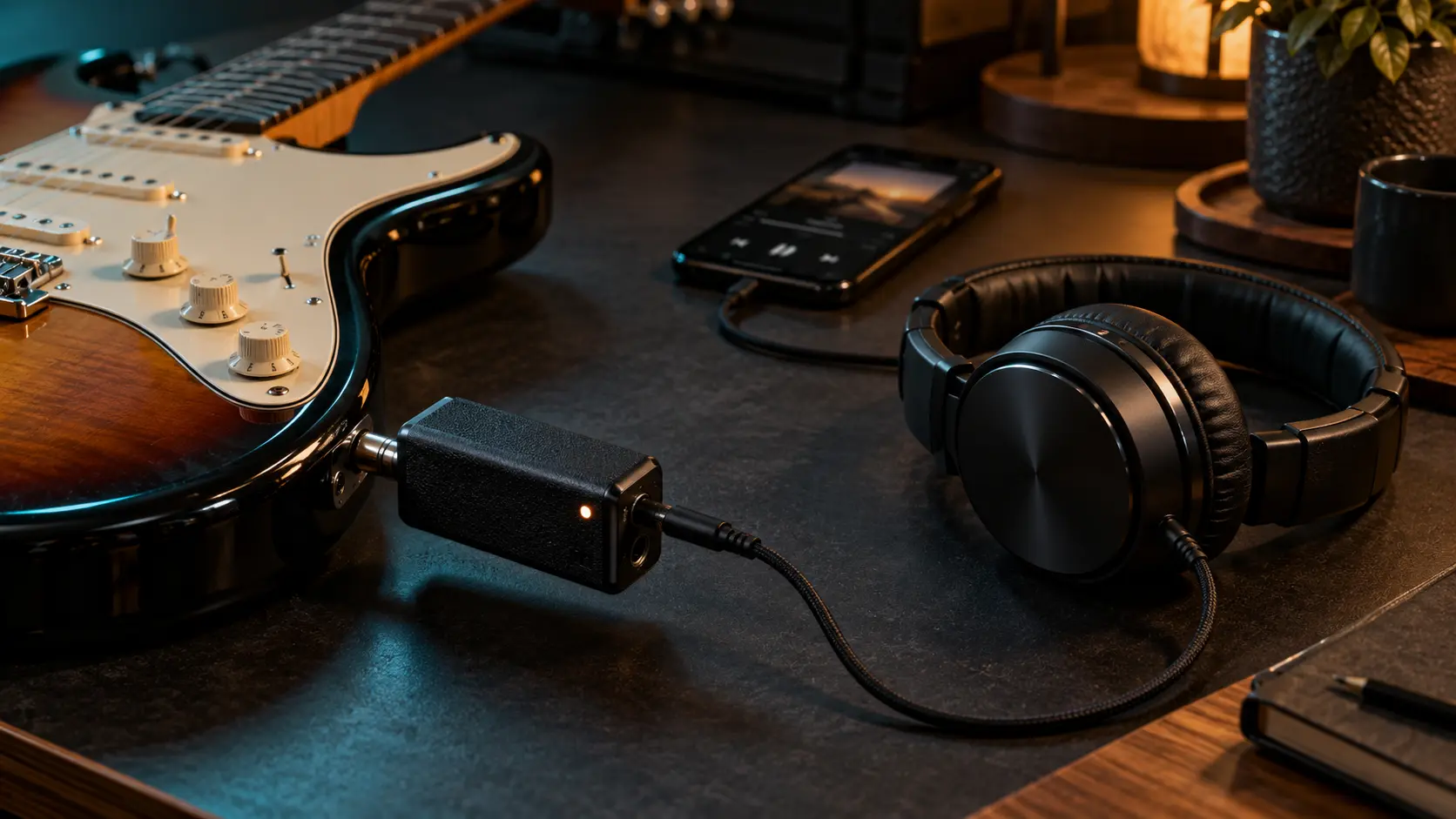
The phrase guitar headphone amp is confusing because several very different products share it. A plug-in unit connects directly to the guitar and feeds headphones. It is tiny, battery powered and normally includes a few amp voices and effects. A desktop or mini combo adds a speaker, making it more useful when silence is not essential. A multi-effects unit gives deeper routing and foot control, while an audio interface relies on a computer or mobile device for processing.
The right category is determined by friction. If the goal is to play for ten minutes before bed, opening a laptop, selecting a driver and loading a project may be excessive. If you want to record layered parts and change cabinets after tracking, a simple pocket amp will become limiting. Our practice amp vs amp sim vs modeler guide maps those trade-offs in more detail.
Why Cabinet Simulation Matters More Than the Amp Count
An electric guitar amplifier is only half of a recorded guitar sound. The speaker and cabinet remove aggressive high frequencies, shape the mids and create the familiar sense of weight. Sending a distorted preamp straight into headphones without a cab simulation usually sounds fizzy, thin and unnaturally direct. That is why even a modest headphone amp with one good speaker emulation can sound more convincing than a feature-heavy unit with weak cabinet processing.
When comparing products, listen for pick attack and chord separation rather than being impressed by a huge preset. High gain should retain individual notes without an abrasive layer of top end. If a device offers selectable cabinets or IRs, that is genuinely useful, but it is not essential for a beginner. The practical fixes in our guitar EQ cheat sheet also apply to headphone rigs.
Latency: Why the Guitar Should Stay Wired
Bluetooth is excellent for sending a song or backing track into a practice device, but standard Bluetooth adds too much delay for the live guitar signal. Even a small delay between the pick and the sound makes rhythm feel disconnected. A reliable setup keeps the guitar connected by a normal cable or direct plug while Bluetooth handles only playback audio. Marketing language can blur that distinction, so check the signal path rather than assuming “Bluetooth amp” means wireless guitar.
Hardware headphone amps normally feel immediate because the processing is self-contained. Interfaces can also have excellent latency, but buffer size, driver quality and computer load matter. If you hear a slap-like delay, do not compensate with your playing; fix the monitoring route. Direct monitoring is only useful for clean input unless the interface or software can include the processed amp sound at low latency.
Choosing Headphones That Do Not Ruin the Tone
A headphone amp does not need expensive studio headphones, but it does need a sensible electrical and tonal match. Small battery devices often work best with headphones in roughly the 30–80 ohm range. Very high-impedance models may play too quietly or run out of clean headroom. Extremely bass-heavy consumer headphones can make palm-muted guitars woolly, while a bright pair can exaggerate digital fizz.
Closed-back headphones reduce leakage and keep late-night practice private. Open-back models often feel wider and more natural, but anyone nearby will hear part of the performance. Comfort matters because clamp pressure and heat end practice sessions faster than subtle frequency-response differences. Our guide to headphones for practicing guitar covers affordable matches in more depth.
Six Guitar Headphone Amp Options That Make Sense
Here is the practical shortlist. These are different tools for different players, not six versions of the same idea.
| Best all-around | Fender Mustang Micro Plus | Deep enough to grow with, still quick enough for a ten-minute session. |
|---|---|---|
| Best budget choice | Vox amPlug 3 AC30 | One focused amp flavor, simple controls, no Bluetooth. |
| Best for high-gain players | Boss Katana:GO | Strong gain sounds, useful spatial processing and a proper practice ecosystem. |
| Best for app-based editing | NUX Mighty Plug Pro | Plenty of models, IR support and detailed mobile control. |
| Best for captured amp tones | TONEX Plug | A huge ToneNET library and convincing captured rigs in a pocket format. |
| Best for a pedalboard | EarthQuaker Devices Easy Listening | A deliberately simple clean platform that sits at the end of an existing chain. |
Fender Mustang Micro Plus: the safest all-around pick
The Mustang Micro Plus combines 25 amp models, 25 effects, app editing, a tuner and USB recording without turning the product into a tiny menu puzzle. Its weak point is low-tuned, bass-heavy playing at higher headphone levels, where the low end can overload. For standard-tuned practice, mixed styles and players who want one purchase that will not feel basic in six months, it is the most balanced choice.
Vox amPlug 3 AC30: less choice, less friction
The Vox amPlug 3 AC30 is the opposite approach. It is inexpensive, battery powered and built around a specific AC30-style voice. There is no Bluetooth, so backing tracks need an aux cable, and effect switching is not elegant. The trade is immediacy: if classic clean and crunchy British sounds are the goal, one convincing character can be more useful than fifty models.
Katana:GO, Mighty Plug Pro and TONEX Plug
The Boss makes the strongest case for players who want polished high-gain sounds and a practice-focused interface. NUX is the tinkerer’s option, with models and IR control that reward time in the app. TONEX Plug is the most interesting route if captured amps matter more than a traditional fixed model list. All three use Bluetooth for music playback, not for the live guitar signal. If you prefer a speaker and physical knobs, the Boss Katana Mini review covers the simpler alternative.
Easy Listening: the pedalboard answer
If the pedals are already the rig, buying another box full of effects is redundant. The Easy Listening provides a simple Fender-like amp and speaker path for headphones at the end of a pedalboard. It has one core sound and no IR loading, but that narrow purpose is why it works. For a larger desktop version of the all-in-one idea, see our Hotone Pulze review.
Audio Interface and Amp Sim: Best When Recording Matters
An interface and software rig offers the deepest editing, the easiest recording and the ability to change amps, cabinets and effects after a part is captured. It can also scale from a simple bedroom setup into serious production. The downside is startup time and the temptation to spend a practice session browsing presets.
This route works best when the computer is already part of your playing space. Set one reliable template, keep the buffer low and stop treating every session as a tone-design project. If your software tones feel harsh or distant, our home guitar tone troubleshooting guide addresses the usual gain, input and cab mistakes.
Features Worth Paying For—and Features You Can Ignore
Independent guitar and music volume controls are more valuable than dozens of obscure effects. USB-C charging, a visible battery indicator, a tuner and a physical master level improve daily use. For learning songs, Bluetooth or aux playback matters. For recording, confirm whether USB carries audio or only power; manufacturers often place the USB logo prominently even when the port cannot act as an interface.
Do not pay extra simply for hundreds of community presets. They vary wildly in level and quality, and many are designed to sound impressive alone rather than sit under your fingers. A small group of balanced clean, crunch and lead sounds is more useful. The same low-volume principles in our bedroom guitar tone guide will improve almost any device.
How to Set Up a Better Silent Practice Sound
Start with a clean or medium-gain amp, a cab simulation and no ambience. Set the guitar input so hard picking does not clip, then raise headphone volume to a comfortable level. Add gain only until notes sustain properly. If the sound is boomy, reduce bass before adding treble; if it is fizzy, lower presence or choose a darker cabinet. Finish with a short room reverb rather than a huge wash.
For high gain, use less distortion than you expect and keep the backing track slightly below the guitar while learning. Once the part is secure, reverse that balance to test whether your timing works in context. A good guitar headphone amp should reveal mistakes without making the sound so unpleasant that you avoid practicing.
Which Setup Fits Your Actual Routine?
Choose a plug-in amp if portability and instant use are the priorities. Choose a smart mini combo if one device must cover headphones, casual speaker practice and backing tracks. Choose a multi-effects unit if you need foot control or plan to connect to powered speakers later. Choose an interface if recording and detailed tone shaping are central goals.
If you already own a capable modeling amp, check its headphone output before buying another product. The upgrade may be better headphones or a more disciplined preset. Conversely, a technically superior rig is not an upgrade if it creates enough setup friction that you play less.
The Short Version
For most players who want the fastest possible setup, a modern plug-in headphone amp is the right answer. Choose a compact modeling combo if you also want a speaker, or an interface and amp sim if recording depth matters more than convenience. Do not buy on the number of models alone: a good cab simulation, sensible controls and easy volume management matter more.
Frequently Asked Questions
Can I plug headphones directly into an electric guitar?
No. Passive guitar output is too weak and has no amp or cabinet processing. You need a headphone amp, modeler, compatible practice amp or audio interface.
Can I use Bluetooth headphones for guitar?
Usually not for live monitoring because Bluetooth latency is distracting. Use wired headphones; Bluetooth can still carry backing tracks into the device.
Is a headphone amp good enough for beginners?
Yes. A clear, low-latency sound and easy access to backing tracks can be an excellent first rig, provided the player does not need to play aloud.
Do more amp models mean better sound?
No. A few well-tuned models with convincing cabinet simulation and sensible levels are more useful than a huge inconsistent library.